Real Email Attacks. Stopped Cold.
The anatomy of seven email scams, intercepted before they reached the inbox
Key takeaways
- Every month, Barracuda detects and blocks around 4.9 million brand and service impersonation emails, 46,065 QR code phishing (quishing), 242,300 CEO/executive impersonations attacks, 960,000 Bayesian-poisoning phishing emails, and 110,000 non-English phishing emails.
- To illustrate the many tactics and layers seen in today’s sophisticated email attacks, we selected seven examples.
- Each email is shown exactly as it arrived, alongside the signals that exposed it and where it would have taken anyone who clicked.
Brand-impersonation phishing
The “missing package” trap
TARGETED SECTOR: Building products and cabinetry distribution
REGION: United States
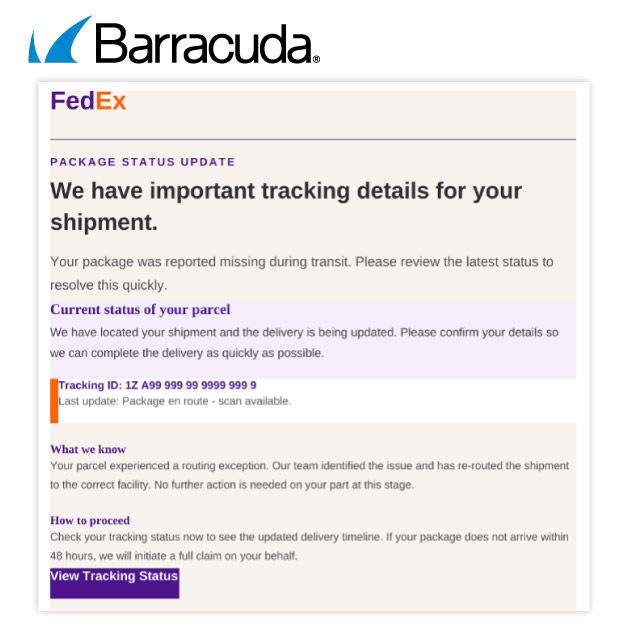
What the recipient saw. A polished fake FedEx notice. Recipient and organization details anonymized.
THE LURE
A pixel-perfect FedEx “package reported missing” notice manufactured urgency and offered one obvious action: a “View Tracking Status” button. That button did not lead to FedEx — it pointed to an unrelated, hijacked website built to harvest information and push a payload.
WHERE THE LINK WOULD HAVE LED
hxxp://www[.]uscarcheck[.]com/core_headlinewire/0qjyvkxn6
The FedEx-branded “View Tracking Status” button pointed here — an unrelated, likely-compromised website with no connection to FedEx, staged to harvest data and deliver a payload. (URL defanged for safety.)
DETECTION SIGNALS
- Brand impersonation: A FedEx-branded template sent without any authenticated FedEx sending domain.
- Link mismatch: The visible “FedEx” call-to-action resolved to an unrelated, likely-compromised host — not a FedEx property.
- Tracking inconsistency: The quoted tracking ID uses a "1Z…" format (a UPS convention) inside a FedEx-branded email.
- Text / Bayesian poisoning: Two hidden text blocks (one display:none, one positioned off-canvas) were stuffed with benign, unrelated prose to dilute spam scoring and confuse content classifiers.
- Fear and urgency: “Reported missing,” a 48-hour window and a threatened “claim” pressure the reader to act before thinking.
INDICATORS AND ARTIFACTS
- Displayed CTA: “View Tracking Status” (FedEx-branded)
- Actual destination: hxxp://www.uscarcheck[.]com/core_headlinewire/0qjyvkxn6
- Rewrite wrapper: linkprotect.cudasvc.com/url?a=…&typo=1 (link inspected & defanged)
- Spoofed tracking ID: 1Z A99 999 99 9999 999 9 (UPS-format in a FedEx template)
- Evasion fingerprint: hidden preheader text: “trail conditions”, “kimchi”, “gooseberries”
OUTCOME
Barracuda Email Protection recognized the message as a brand-impersonation attempt and saw that the “FedEx” button resolved to a suspicious, non-FedEx domain. The link was neutralized, and the message stopped before it ever reached the inbox.
QR-code phishing: Quishing
The QR code that wanted your password
TARGETED SECTOR: Fine wine and spirits retail
REGION: United Kingdom
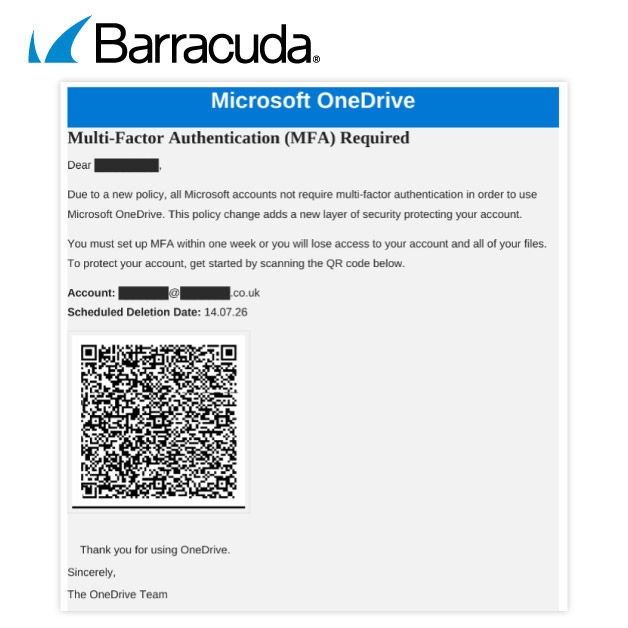
What the recipient saw. A fake Microsoft OneDrive "MFA required" notice with a malicious QR code. Details anonymized.
THE LURE
An email posing as Microsoft OneDrive claimed a new policy required multifactor authentication “within one week or you will lose access to your account and all of your files.” The only path forward was to scan a QR code — which pulls the victim onto a personal phone and a counterfeit Microsoft login page built to steal credentials.
WHERE THE LINK WOULD HAVE LED
Destination is encoded inside the QR image. There is no clickable link to inspect.
Scanning the code opens a counterfeit Microsoft 365 sign-in page (a login.microsoftonline.com look-alike) built to capture the username, password and MFA code in real time.
DETECTION SIGNALS
- QR-based evasion: The actionable URL exists only inside a base64-encoded PNG QR image. There is no clickable or text URL for traditional URL filters to score.
- Out-of-band pivot: Scanning forces the next step onto a mobile device, outside the protections applied to the corporate endpoint.
- Brand impersonation: A Microsoft / OneDrive look-alike template sent from a non-authenticated Microsoft domain.
- Linguistic anomaly: “all Microsoft accounts not require multi-factor authentication” — a grammatical defect inconsistent with genuine Microsoft communications.
- Coercion: A hard one-week deadline plus a “Scheduled Deletion Date” and threatened loss of all files.
INDICATORS AND ARTIFACTS
- Payload delivery: URL embedded only inside a base64 PNG QR image (no text URL)
- Impersonated brand: Microsoft OneDrive / “MFA required”
- Coercion markers: “within one week”, “Scheduled Deletion Date: 14.07.26”
- Linguistic tell: “accounts not require multi-factor authentication”
- Personalization: Recipient name and email address prefilled to raise trust
OUTCOME
Barracuda Email Protection analyzed the embedded QR image, recognized the credential-harvesting intent behind the OneDrive/MFA impersonation and its coercive deadline, and blocked the message before it reached the mailbox.
Executive impersonation and business email compromise (BEC)
The CEO who needed your number
TARGETED SECTOR: Construction products and distribution
REGION: United States
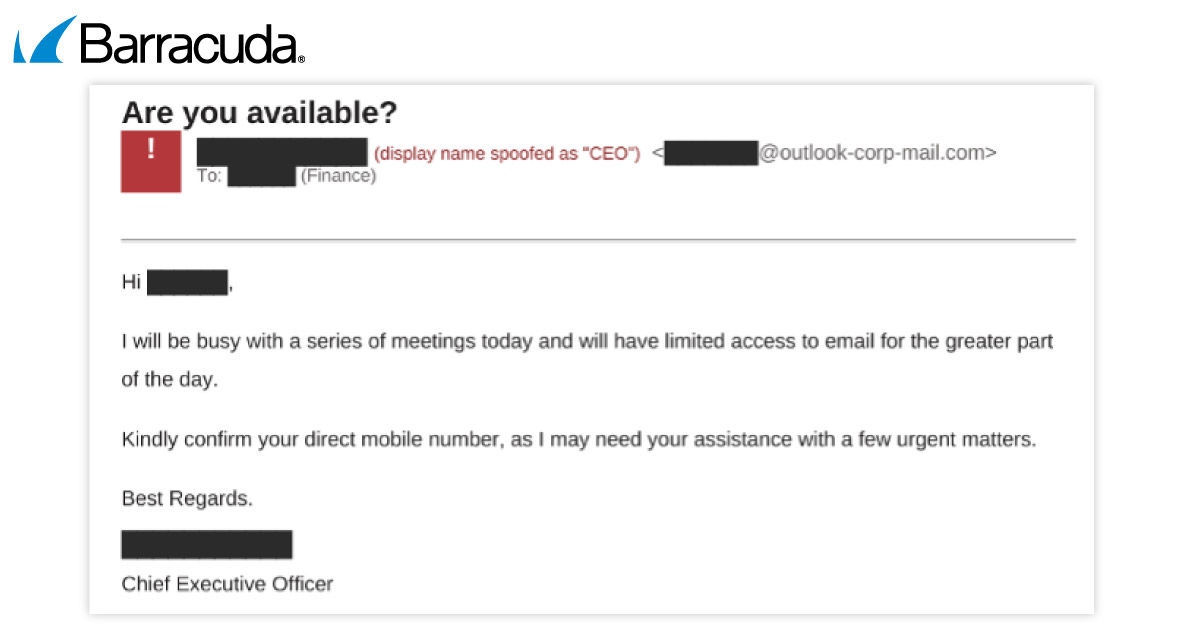
What the recipient saw. A clean, payload-free note impersonating the CEO. Details anonymized.
THE LURE
A short, friendly note appearing to come from the CEO: “I’m in meetings all day — kindly confirm your direct mobile number.” No link. No attachment. Nothing for a scanner to detonate. It is the opening move: Once the attacker has a phone number, the conversation moves to text messages and typically ends in an urgent gift-card purchase or wire transfer.
WHERE THE LINK WOULD HAVE LED
No URL and no attachment.
The “click” is simply a reply. Once the attacker obtains the direct mobile number, the attack continues over SMS (smishing) — typically ending in an urgent gift-card purchase or wire transfer.
DETECTION SIGNALS
- Display-name spoof: A "Chief Executive Officer" display name paired with an external, look-alike sending address that fails alignment with the real corporate domain.
- Zero-payload social engineering: No URL and no attachment — deliberately nothing for link or attachment sandboxing to catch.
- Channel-switch pretext: “Limited access to email,” “urgent matters,” and a request for a mobile number — the hallmark handoff from email (BEC) to SMS (smishing).
- Legitimacy props: A formal “Confidentiality Notice” footer borrowed to manufacture authenticity.
- High-value targeting: Aimed at a finance / executive-assistant recipient with authority to move money.
INDICATORS AND ARTIFACTS
- Display name: “[redacted] — Chief Executive Officer” (impersonated)
- Actual sender: External look-alike address (non-corporate domain)
- Payload: None — no link, no attachment (evades sandboxing)
- Pretext: “confirm your direct mobile number” → SMS pivot
- Objective: Establish out-of-band channel for gift-card / wire fraud
OUTCOME
Barracuda Email Protection flagged the executive-impersonation pattern — a high-value display name paired with an external, non-corporate sending address and the classic
“are you available / send me your number” pretext — and kept it out of the inbox.
Bayesian-poisoning (hidden text) phishing
The poisoned "free kit" offer
INDUSTRY SECTOR: Logistics and supply chain services
REGION: United States
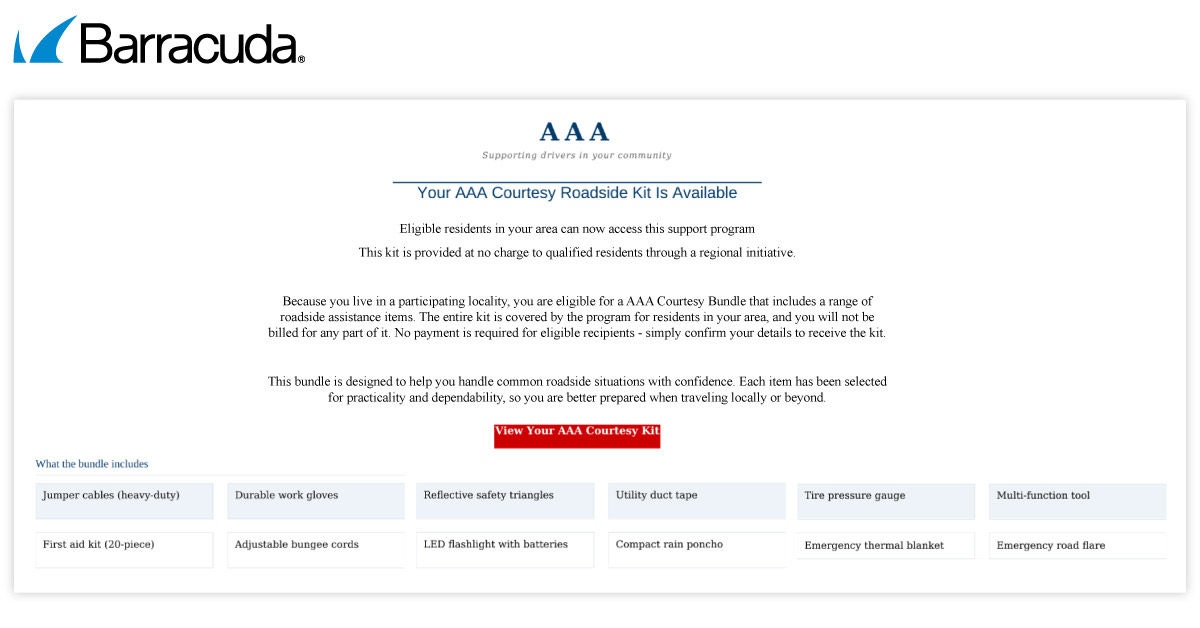
What the recipient saw. A fake AAA "free roadside kit" offer. Recipient and organization details anonymized.
THE LURE
A polished note impersonating AAA told the recipient they qualified for a free “Courtesy Roadside Kit” — no charge, just “confirm your details.” The generous framing and a detailed product list lowered the reader’s guard; the real goal was the personal information collected on the linked page.
WHERE THE LINK WOULD HAVE LED
hxxp://www[.]sharpchurch[.]com/details_anchor/quwmasllolwckv/line
The red “View Your AAA Courtesy Kit” button led to a compromised third-party website — not AAA — that opened a data-harvesting flow to “confirm your details.” (URL defanged for safety.)
DETECTION SIGNALS
- Bayesian poisoning: Two blocks of hidden text (one display:none, one collapsed to zero size) were packed with benign, unrelated prose — a “garden layout plan” and a “workshop setup” — to dilute spam scoring and skew content classifiers toward “safe.”
- Brand impersonation: AAA branding and tagline reused but sent from a compromised third-party domain with no AAA affiliation.
- Too-good-to-be-true lure: A free, no-charge “courtesy kit” requiring only that the recipient “confirm your details.”
- Link mismatch: The AAA-branded button resolved to an unrelated, compromised website hosting the data-capture page.
- Manufactured scarcity: “Supplies are limited... distributed on a first-confirmed basis” to rush a response.
INDICATORS AND ARTIFACTS
- Displayed CTA: “View Your AAA Courtesy Kit” (AAA-branded)
- Actual destination: hxxp://www[.]sharpchurch[.]com/details_anchor/quwmasllolwckv/line
- Impersonated brand: AAA (“Supporting drivers in your community”)
- Poisoning fingerprint: Hidden text: “garden layout plan... tomatoes along the south side...”
- Second hidden block: Zero-size span: “I finished setting up the workshop space...”
OUTCOME
Barracuda Email Protection saw through the disguise. Buried in the message was a wall of hidden, unrelated text designed purely to fool statistical spam scoring. Barracuda’s Bayesian-poisoning detection recognized the technique and stopped the message before delivery.
Non-English phishing – Spanish
The Spanish “payment failed” scam
INDUSTRY SECTOR: Legal services (law firm)
REGION: United States
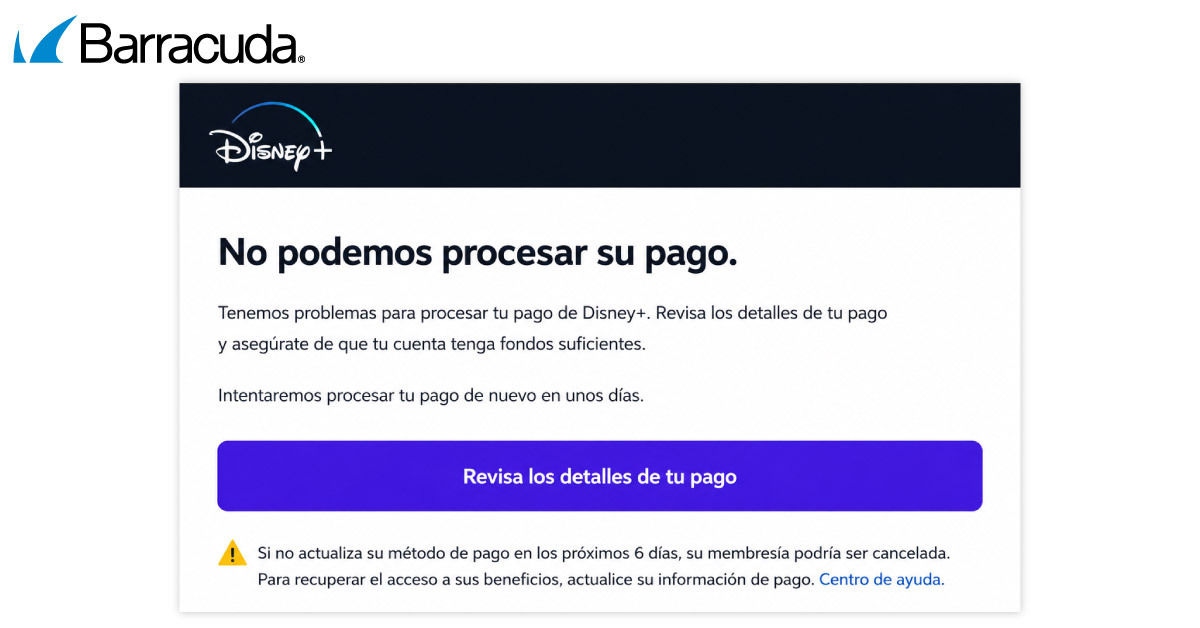
What the recipient saw. A Spanish-language Disney+ “payment problem” notice. Recipient and organization details anonymized.
THE LURE
A Spanish-language email impersonating Disney+ warned that a payment had failed and the membership would be canceled within six days unless the recipient “reviewed their payment details.” The button led to a counterfeit sign-in and payment page built to steal Disney+ credentials and card data.
WHERE THE LINK WOULD HAVE LED
hxxps://jaihindpublicschoolcbse[.]com/public/.floder/?ref=…&email=[redacted]
Wrapped and inspected by Barracuda Link Protection, the button resolved to a credential-harvesting page on a compromised website — a hidden “.floder” path with the victim’s email preloaded into the URL. (URL defanged; recipient address redacted.)
DETECTION SIGNALS
- Foreign-language evasion: Spanish-language content sent to an English-speaking organization to slip past filters and lower recipient scrutiny.
- Brand impersonation: A Disney+ / “My Disney” look-alike, including a homoglyph wordmark (“Ðisney+”) using a non-standard character to dodge exact-string brand matching.
- Link mismatch: The “Revisa los detalles de tu pago” button resolved to a compromised, unrelated website — not a Disney domain.
- Coercion: A hard six-day cancellation deadline and threatened loss of benefits pressure an immediate response.
- Recipient-tagged URL: The victim’s email address was embedded in the link so the harvesting page could pre-confirm the target.
INDICATORS AND ARTIFACTS
- Displayed CTA: “Revisa los detalles de tu pago” (Disney+-branded)
- Actual destination: hxxps://jaihindpublicschoolcbse[.]com/public/.floder/?ref=…&email=[redacted]
- Link wrapper: linkprotect.cudasvc.com/url?a=…&typo=1 (inspected & defanged)
- Impersonated brand: Disney+ / “My Disney” (homoglyph wordmark “Ðisney+”)
- Coercion marker: “en los proximos 6 dias, su membresia podria ser cancelada”
OUTCOME
Barracuda Email Protection is language-agnostic. Its non-English phishing classifier read the Spanish content; recognized the Disney+ impersonation, the coercive six-day deadline and the mismatched link; and blocked the message before delivery.
Brand-impersonation phishing – Dutch
The Dutch “storage full” upsell
REGION: The Netherlands (Dutch-language)
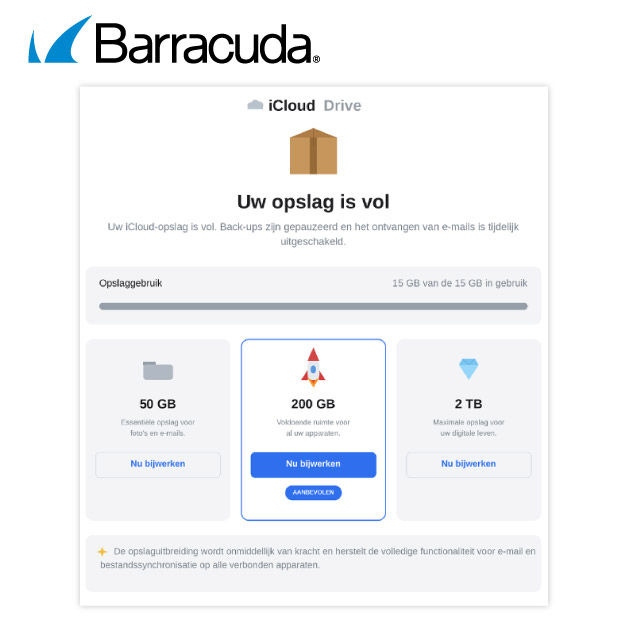
What the recipient saw. A Dutch-language iCloud "storage full" upsell scam. Recipient and organization details anonymized.
THE LURE
A Dutch-language email impersonating Apple iCloud warned that storage was full, that backups were paused, and that incoming email was disabled. Three tempting “upgrade” tiers (50 GB, 200 GB, 2 TB) each pushed a “Nu bijwerken” (Update now) button leading to a counterfeit Apple sign-in and payment page.
WHERE THE LINK WOULD HAVE LED
hxxps://chobanlokan[.]com/ad292b82f55917be115f799b61013b3c
Wrapped and inspected by Barracuda Link Protection, the "Nu bijwerken" (Update now) buttons resolved to a compromised, unrelated website built to capture Apple ID credentials and payment-card details. (URL defanged for safety.)
DETECTION SIGNALS
- Brand impersonation: An Apple iCloud Drive look-alike (logo, plan tiers, “AANBEVOLEN” badge) sent from a compromised, non-Apple domain.
- Foreign-language evasion: Dutch-language content aimed at slipping past filters and lowering recipient scrutiny.
- Fear and scarcity: “Uw opslag is vol” (your storage is full), paused backups, disabled email, and a highlighted “recommended” tier to rush an upgrade.
- Link mismatch: Every “Nu bijwerken” button resolved to the same compromised, unrelated website, not an Apple property.
- Payment lure: The flow drives toward entering Apple ID credentials and payment-card details to “upgrade” storage.
INDICATORS AND ARTIFACTS
- Displayed CTA: “Nu bijwerken” (Update now), Apple iCloud-branded
- Actual destination: hxxps://chobanlokan[.]com/ad292b82f55917be115f799b61013b3c
- Link wrapper: linkprotect.cudasvc.com/url?a=...&typo=1 (inspected and defanged)
- Impersonated brand: Apple iCloud Drive
- Lure language: Dutch: “Uw opslag is vol”
OUTCOME
Barracuda Email Protection recognized the Apple / iCloud brand impersonation, read the Dutch content with its language-agnostic classifier, and saw that every “upgrade” button resolved to a non-Apple, compromised website. The message was blocked before delivery.
Credential harvesting – French
The French “shared document” trap
INDUSTRY SECTOR: Food, bakery and restaurant
REGION: France
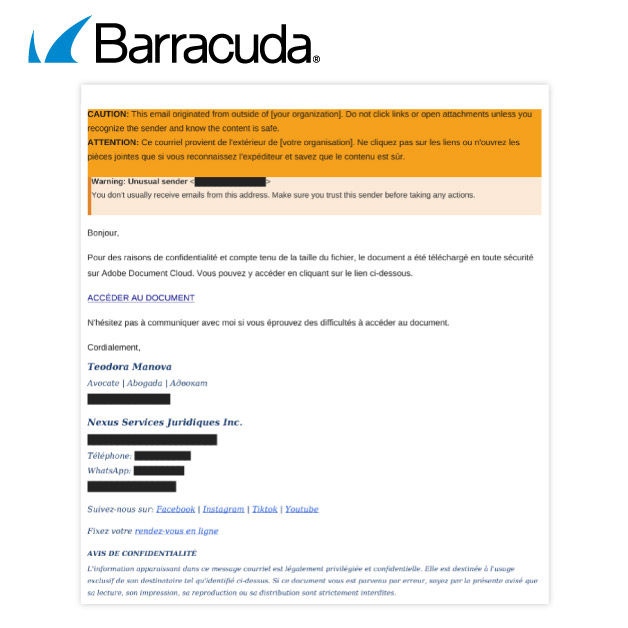
What the recipient saw. A French-language “shared legal document” lure. Recipient and organization details anonymized.
THE LURE
A French-language email, styled as a note from a lawyer, said a confidential document was too large and had been uploaded “securely to Adobe Document Cloud,” with a single link to “ACCEDER AU DOCUMENT” (access the document). The link led to a counterfeit Adobe sign-in built to harvest email credentials.
WHERE THE LINK WOULD HAVE LED
hxxps://crestline[.]it[.]com/securedoc/
Wrapped and inspected by Barracuda Link Protection, the “ACCEDER AU DOCUMENT” link resolved to a credential-harvesting page on a compromised website, disguised as an Adobe Document Cloud sign-in. (URL defanged for safety.)
DETECTION SIGNALS
- Fake cloud-document pretext: A “confidential, too-large” file supposedly hosted on “Adobe Document Cloud,” reachable only through a single link.
- Foreign-language lure : French-language content plus a full bilingual legal signature to project legitimacy.
- Link mismatch: The “ACCEDER AU DOCUMENT” link resolved to a compromised, unrelated website, not an Adobe property.
- Impersonated authority: A detailed law-firm persona (multilingual title, address, phone numbers, social links, confidentiality notice) borrowed to build trust.
- Unusual external sender: The message came from an external address the recipient had no prior relationship with.
INDICATORS AND ARTIFACTS
- Displayed CTA: “ACCEDER AU DOCUMENT” (fake Adobe Document Cloud)
- Actual destination: hxxps://crestline[.]it[.]com/securedoc/
- Link wrapper: linkprotect.cudasvc.com/url?a=...&typo=1 (inspected and defanged)
- Impersonated service: Adobe Document Cloud (shared-document lure)
- Sender: external address impersonating an outside law firm (details redacted)
OUTCOME
Barracuda Email Protection read the French content with its language-agnostic classifier, recognized the fake “Adobe Document Cloud” pretext, and saw that the “ACCEDER AU DOCUMENT” link resolved to a compromised credential-harvesting page. The message was blocked before delivery.
Seven attacks — none reached the target’s inbox
Brand impersonation, malicious links, QR-code credential theft, CEO fraud, hidden-text “poisoning,” and foreign-language scams — all identified and blocked by Barracuda Email Protection. That is the power of layered protection.






Subscribe to the Barracuda Blog.
Sign up to receive threat spotlights, industry commentary, and more.