

What is the Microsoft 365 Direct Send vulnerability? A complete guide to the risk and the fix
The “Direct Send vulnerability” refers to attackers abusing Microsoft 365 Direct Send — a legitimate, low-security mail path built for printers, scanners and line-of-business applications — to deliver phishing emails that look like they came from inside your own organization.
It is not a software bug and has no CVE. It’s a misuse of intended functionality, which is exactly what makes it so dangerous: The traffic never touches an external email security gateway, and because it looks like internal mail, standard authentication checks don’t stop it.
Barracuda security analysts identified a large-scale phishing campaign exploiting this pathway. Attackers send messages that impersonate internal communications and carry a PDF attachment containing a QR code. The recipient is told to scan the code to retrieve a “voice message.” Scanning it leads to a fake Microsoft login page designed to harvest credentials, which are then sold or used to launch a larger attack against the organization. Full technical detail is available in the Barracuda Security Advisory and the Cybersecurity Threat Advisory.
If you use Barracuda Email Gateway Defense, follow these steps to confirm Direct Send has been secured in your Microsoft 365 connectors. It takes only a few minutes.
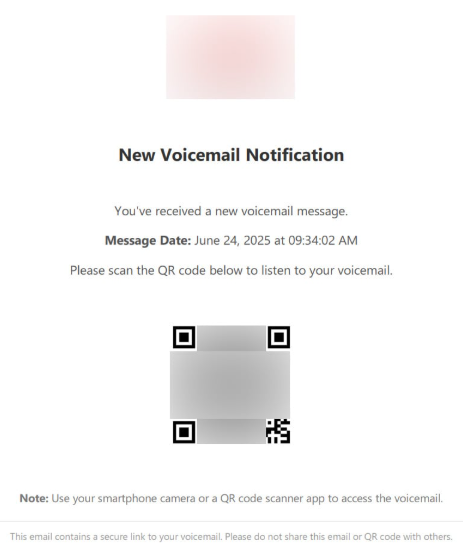
PDF document with QR codes, via Bleeping Computer
What is Direct Send, and why does it exist?
Direct Send is a Microsoft 365 feature that allows email to be sent without authentication. It exists so that non-email systems — networked printers, scan-to-email devices, monitoring tools, line-of-business applications — can send mail to recipients inside the same domain without needing full mailbox credentials or SMTP AUTH setup. Microsoft documents the legitimate use case here.
The critical detail for security teams: Direct Send traffic uses internal Microsoft 365 infrastructure and does not pass through external email security gateways. It is not subject to the same authorization and filtering as normal inbound mail. If you have not explicitly secured or restricted it, this pathway is open by default in most tenants.
Is Direct Send a vulnerability, an exploit or something else?
This is the question most IT teams ask first, and the answer matters for how you prioritize the fix. Direct Send is not an unpatched vulnerability in any Microsoft or third-party system. According to Barracuda’s Cybersecurity Threat Advisory, the attack is particularly concerning for several reasons:
- Abuse of a legitimate feature — the attack leverages a built-in Microsoft 365 function, making it difficult to disable without disrupting business operations.
- No CVE assigned — since this is misuse of intended functionality rather than a software flaw, it has no CVE identifier, which complicates tracking and remediation across security tools.
- Bypasses standard email authentication — traditional defenses relying on SPF, DKIM, and DMARC are ineffective against this tactic because the mail never needs to pass those checks.
- Internal sender spoofing — messages appear to come from trusted internal sources, increasing the likelihood that recipients will interact with them.
- Widespread exposure — any organization using Microsoft 365 with Direct Send enabled (which is most tenants, by default) is potentially at risk.
In short: there is nothing to “patch,” which means the risk stays open until an administrator takes deliberate action to configure or restrict the pathway.
How the Direct Send phishing attack works
The campaign Barracuda identified follows a consistent pattern:
- An email arrives that appears to be from an internal colleague or system, using Direct Send to spoof an internal address.
- The message carries a PDF attachment containing a QR code and a prompt to scan it to access a “voice message.”
- Scanning the code routes the victim to a convincing fake Microsoft login page.
- Entered credentials are captured by the attacker, then sold or used to escalate into account takeover, business email compromise, or further lateral movement inside the organization.
How to secure Direct Send in your environment
You do not have to reject all Direct Send mail to close this gap, but you do have to take deliberate action — Direct Send is not secured automatically.
Microsoft’s control: Microsoft introduced a “Reject Direct Send” feature in April 2025 that blocks all Direct Send traffic. It is turned off by default, and Microsoft cautions administrators to test carefully before enabling it, since it can break legitimate business functions like printer-to-email workflows and application notifications.
Barracuda Email Gateway Defense customers: If you configured your Microsoft 365 connectors correctly, Direct Send may already be secured without disabling legitimate use. This step-by-step Barracuda Campus article walks through the configuration and takes only a few minutes to complete. If you are not certain Direct Send has been secured in your environment, work through that document now or contact Barracuda Support — support is 24x7, with real people, not a phone tree.
This is the kind of fix that shouldn't require a security specialist or a weekend project. Barracuda Email Protection, including Email Gateway Defense, is built for IT teams that don’t have spare cycles to chase down every new attack technique. Deployment and configuration are designed to be fast, and the guidance above is meant to be actionable in minutes, not days.
Frequently asked questions
Do I actually need Direct Send enabled? If your organization uses networked printers, scan-to-email devices, monitoring systems, or line-of-business applications that send notification emails to internal users, you likely rely on Direct Send today. That’s why Microsoft and Barracuda both recommend securing the pathway rather than blindly rejecting it.
Will blocking Direct Send break anything? Possibly. Microsoft’s “Reject Direct Send” control blocks all Direct Send traffic, which can disrupt printers and applications that depend on it. Test before enabling broadly, and use the Barracuda configuration steps if you want to secure the pathway without a blanket rejection.
How do I know if my organization is exposed? If you haven’t specifically configured your Microsoft 365 connectors or enabled Microsoft’s rejection control, assume you’re exposed — Direct Send is open by default. Barracuda Email Gateway Defense customers can confirm their configuration using the Campus article, or contact Barracuda Support for help.
Why don’t SPF, DKIM and DMARC stop this? Because Direct Send messages are generated and delivered through Microsoft’s internal infrastructure rather than routed like normal external mail, they don’t need to pass the authentication checks those protocols enforce. The mail looks internal because, technically, it is.
Further resources







Subscribe to the Barracuda Blog.
Sign up to receive threat spotlights, industry commentary, and more.
